Bakerydrop AWS Infrastructure & Deployment Guide
Overview
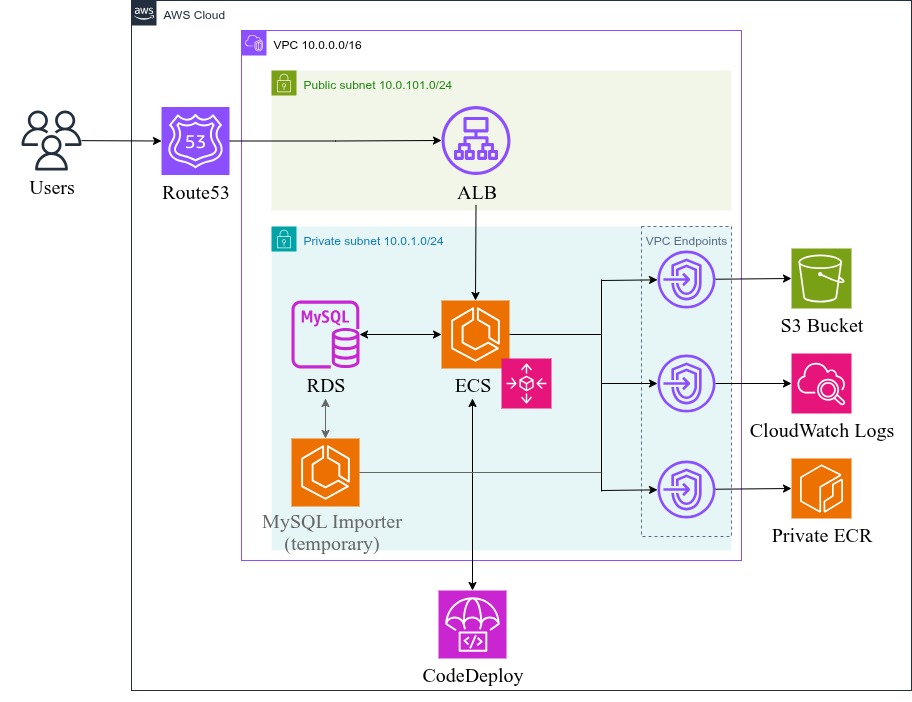
Bakerydrop is a PHP-based bakery ordering system deployed on AWS using a modern containerized architecture. The application uses OpenTofu (Terraform) for infrastructure as code and GitHub Actions for CI/CD with blue-green deployments.
Architecture Overview
The infrastructure consists of:
- VPC with public/private subnets across 2 AZs
- Application Load Balancer for HTTPS termination and traffic distribution
- ECS Fargate for containerized application hosting
- RDS MySQL for database storage
- ECR for container image registry
- S3 for environment configuration storage
- Route53 for DNS management
- CodeDeploy for blue-green deployments
Infrastructure Components (OpenTofu/Terraform)
Core Infrastructure (setup/main.tf)
1. VPC and Networking
# VPC Configuration
- CIDR: 10.0.0.0/16
- Public Subnets: 10.0.101.0/24, 10.0.102.0/24
- Private Subnets: 10.0.1.0/24, 10.0.2.0/24
- Availability Zones: eu-central-1a, eu-central-1b
Resources Created:
- VPC with DNS hostnames enabled
- Internet Gateway for public subnet access
- Public/Private subnets across 2 AZs
- Route tables and associations
- VPC Endpoints for ECR, S3, and CloudWatch Logs
2. Security Groups
- ALB Security Group: Allows HTTP (80), HTTPS (443), and test port (8080)
- ECS Tasks Security Group: Allows inbound from ALB on port 80
- RDS Security Group: Allows MySQL (3306) from VPC CIDR
- MySQL Importer Security Group: Temporary access for database setup
3. Application Load Balancer (ALB)
Configuration:
- Internet-facing ALB in public subnets
- HTTPS listener (443) with SSL certificate
- HTTP to HTTPS redirect (301)
- Test listener (8080) for blue-green deployments
- Two target groups (blue/green) for zero-downtime deployments
4. RDS MySQL Database
Specifications:
- Engine: MySQL 8.0
- Instance Class: db.t4g.micro
- Storage: 20GB GP2
- Multi-AZ: No (cost optimization)
- Backup Retention: 7 days
- Encryption: At rest
5. ECS Fargate Cluster
Configuration:
- Fargate launch type (serverless containers)
- Container Insights enabled
- Auto Scaling: 1-3 tasks based on CPU/Memory
- Blue-Green deployment support via CodeDeploy
6. Container Registry (ECR)
- Main application repository:
bakerydrop - MySQL importer repository:
bakerydrop-mysqlimporter - Image scanning enabled
- Lifecycle policies for cost optimization
7. S3 Bucket for Environment Files
Features:
- Versioning enabled
- Server-side encryption (AES256)
- Public access blocked
- Stores .env configuration files
8. Route53 DNS
- A record pointing to ALB
- SSL certificate validation
- Custom domain support
9. CodeDeploy for Blue-Green Deployments
Configuration:
- ECS deployment type
- Blue-Green strategy
- Automatic rollback on failure
- 5-minute termination wait time
MySQL Importer Module (setup/modules/mysqlimporter/)
A temporary ECS task for database initialization:
Components:
- Dedicated ECR repository
- ECS cluster and task definition
- Security group with database access
- IAM roles for task execution
Process:
- Builds Docker image with SQL dump
- Runs as Fargate task to initialize database
- Creates application user and imports schema
- Self-destructs after completion
GitHub Actions Workflows
1. Infrastructure Setup (setup.yml)
Trigger: Manual workflow dispatch
Steps:
Environment Setup
- Checkout code
- Install AWS CLI v2
- Configure AWS credentials
- Setup OpenTofu
Infrastructure Deployment
tofu init
tofu plan -out=tfplan.out
tofu apply tfplan.out
Database Initialization
- Build MySQL importer Docker image
- Push to ECR
- Run ECS task to import database schema
- Monitor task completion
- Clean up importer resources
Environment Configuration
- Generate .env file with database credentials
- Upload to S3 bucket for application access
Required Secrets:
AWS_ACCESS_KEY_IDAWS_SECRET_ACCESS_KEYDB_ADMIN_USERDB_ADMIN_PASSWORDDB_APP_USERDB_APP_PASSWORDECS_CONTAINER_IMAGEROUTE53_HOSTED_ZONE_IDACM_CERTIFICATE_ARN
2. Application Deployment (deploy.yml)
Trigger: Manual workflow dispatch (can be configured for push to main)
Blue-Green Deployment Process:
Build Phase
- Checkout latest code
- Build Docker image with multi-stage build
- Push to ECR with
latesttag
Deploy Phase
- Update ECS task definition with new image
- Trigger CodeDeploy blue-green deployment
- Route test traffic to green environment (port 8080)
- Validate deployment health
- Switch production traffic to green
- Terminate blue environment after 5 minutes
Environment Variables:
AWS_REGION: eu-central-1
ECR_REPOSITORY: bakerydrop
ECS_CLUSTER: bakerydrop-cluster
ECS_SERVICE: bakerydrop-service
CODEDEPLOY_APPLICATION: bakerydrop-deploy
Container Architecture
Multi-Stage Dockerfile
The application uses a sophisticated multi-stage Docker build:
Stage 1: Builder
FROM php:8.3-fpm-alpine AS builder
# Install build dependencies
# Install Composer
# Copy and install PHP dependencies
# Optimize autoloader for production
Stage 2: Runtime
FROM php:8.3-fpm-alpine
# Install runtime dependencies:
# - nginx (web server)
# - supervisor (process manager)
# - mysql-client (database connectivity)
# - python3 + boto3 (AWS S3 integration)
Nginx + PHP-FPM Architecture
The container runs both Nginx and PHP-FPM using Supervisor:
Nginx Configuration (nginx.conf)
server {
    listen 80;
    root /var/www/html;

    location ~ \.php$ {
        fastcgi_pass unix:/var/run/php-fpm.sock;
        fastcgi_param SCRIPT_FILENAME $document_root$fastcgi_script_name;
        include fastcgi_params;
    }
}
PHP-FPM Configuration (php-fpm.conf)
[www]
# Unix socket communication with Nginx
listen = /var/run/php-fpm.sock
listen.owner = www-data
listen.group = www-data
listen.mode = 0660

# Process management
pm = dynamic
pm.max_children = 5
pm.start_servers = 2
pm.min_spare_servers = 1
pm.max_spare_servers = 3
Socket Communication
Why Unix Sockets?
- Performance: Faster than TCP sockets for local communication
- Security: No network exposure, file system permissions control access
- Resource Efficiency: Lower overhead than network sockets
How it works:
- PHP-FPM creates Unix socket at
/var/run/php-fpm.sock - Nginx forwards PHP requests to this socket
- PHP-FPM processes the request and returns response
- File permissions ensure only www-data can access
Supervisor Process Management (supervisord.conf)
[program:php-fpm]
command=/usr/local/sbin/php-fpm -F
priority=100

[program:nginx]
command=/usr/sbin/nginx -g "daemon off;"
priority=50
Environment Configuration
Dynamic Configuration Loading (entrypoint.sh)
# Check for S3 environment file
if [ -n "$S3_ENV_FILE" ]; then
    # Download .env from S3 using boto3
    python3 -c "import os, boto3; ..."
else
    # Use environment variables directly
    echo "$ENV_FILE_CONTENT" > /var/www/.env
fi
Benefits:
- Secure credential management via S3
- Environment-specific configurations
- No secrets in container images
- Runtime configuration updates
Deployment Process
Initial Setup
- Configure AWS credentials and secrets in GitHub
- Run
setup.ymlworkflow to create infrastructure - Verify database initialization and S3 configuration
Application Updates
- Push code changes to repository
- Run
deploy.ymlworkflow (or configure automatic triggers) - Monitor blue-green deployment in AWS Console
- Verify application health on test port (8080)
- Production traffic automatically switches after validation
Monitoring and Logging
- CloudWatch Logs: Centralized logging for all services
- Container Insights: ECS performance metrics
- ALB Access Logs: Request tracking and analysis
- Auto Scaling: Automatic capacity management
Security Features
Network Security
- Private subnets for application and database
- Security groups with least privilege access
- VPC endpoints for AWS service communication
- No direct internet access for containers
Data Protection
- RDS encryption at rest
- S3 bucket encryption
- HTTPS-only communication
- Secrets managed via GitHub Secrets and S3
Access Control
- IAM roles with minimal required permissions
- Task-specific execution roles
- VPC-scoped security groups
- File system permissions in containers
Cost Optimization
Resource Sizing
- ECS: 0.25 vCPU, 512MB RAM (adjustable)
- RDS: db.t4g.micro (burstable performance)
- ALB: Application Load Balancer (pay per use)
Auto Scaling
- Scale down to 1 task during low usage
- Scale up to 3 tasks under load
- CPU and memory-based scaling policies
Storage Optimization
- ECR lifecycle policies
- CloudWatch log retention policies
- S3 versioning with lifecycle rules
Troubleshooting
Common Issues
- Database Connection: Check security groups and VPC configuration
- Container Startup: Review CloudWatch logs for initialization errors
- SSL Certificate: Verify ACM certificate and Route53 configuration
- Deployment Failures: Check CodeDeploy logs and rollback if needed
Monitoring Commands
# Check ECS service status
aws ecs describe-services --cluster bakerydrop-cluster --services bakerydrop-service

# View container logs
aws logs tail /ecs/bakerydrop --follow

# Check deployment status
aws deploy get-deployment --deployment-id <deployment-id>
This architecture provides a robust, scalable, and secure foundation for the bakerydrop application with modern DevOps practices and AWS best practices.